

What to Do If You Spill Water or Coffee on Your MacBook
MacBook Spill Water or Coffee on Your MacBook: MacBook can happen unexpectedly and may cause serious internal damage. Acting quickly can help reduce the risk of damage to the keyboard, battery, logic board, and other internal components.
Coffee and tea can be more harmful than plain water because sugar and milk can leave residue on internal components. This residue can cause corrosion if it reaches the logic board or other parts.
This guide explains what to do after spilled water on your MacBook, how to handle MacBook water or coffee damage, and when you should get professional help.
Do This Immediately (First 60 Seconds)
- Power off immediately. Hold the power button for about 10 seconds. Don’t wait for a normal shutdown, and don’t stop to save your work first.
- Unplug the charger and remove all connected devices, including USB drives, external displays, and other accessories. If your hands or clothes are wet, avoid touching it directly. Switch off the power from the circuit breaker if necessary instead to avoid any risk of shock.
- Do not keep using the keyboard or trackpad after the spill. Pressing the keys can push liquid further inside the MacBook.
- Open the MacBook and carefully place it in an upside-down V position. This allows gravity to help drain the liquid instead of letting it move deeper into the device.
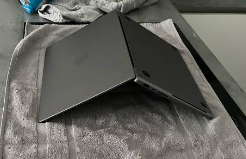
Why Speed Actually Matters: Liquid can reach the keyboard, internal components, and logic board within seconds. Coffee, tea, and other sugary liquids can also leave residue that causes corrosion. This is why powering off the MacBook should always come first before cleaning or drying it.
What to Do in the Next Few Minutes
- After switching off your MacBook, gently blot visible liquid with a soft, lint-free cloth.
- Do not rub or scrub the affected area.
- Use a cotton swab carefully around ports and other small areas if needed.
- Keep the MacBook inverted while it drains.
- Leave it powered off in a dry, room-temperature location.
Do not try to remove internal components yourself unless you have the proper experience and tools.
What You Should NOT Do After a Spill
- Rice is not an effective way to remove moisture from a sealed electronic device. Rice dust can also enter ports and vents and create additional problems.
- Avoid hair dryers, ovens, heaters, or other direct heat sources. Excessive heat can damage components or push liquid further inside the MacBook.
- Do not repeatedly power on the MacBook to see if it works. Electricity passing through wet components can cause a short circuit and increase the damage.
- A MacBook can continue working after a spill while liquid or residue remains inside. Corrosion can cause problems days or even weeks later.
How Long Should You Wait Before Turning It On?
Keep the MacBook powered off and allow it to dry for at least 24–48 hours before attempting to turn it on.
If a large amount of liquid was spilled, it may need more time. Silica gel packets can help reduce moisture in the surrounding area, but they are not a replacement for proper drying and professional inspection.
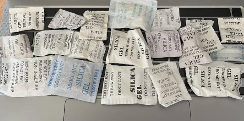
My MacBook Still Turns On After the Spill. Is It Safe?
Not necessarily, and this is the part most guides skip. Coffee, tea, and other sugary or dairy-containing liquids can keep corroding components internally even after the visible spill is cleaned up and the MacBook appears to work normally.
Watch for delayed symptoms over the following days and weeks, like keys that turn sticky or unresponsive, random shutdowns, battery issues, or a trackpad that starts behaving oddly. Any of these can be corrosion setting in after the fact, well after the spill itself is a memory.
When Should You Get Professional Help?
Professional inspection is recommended if a large amount of liquid was spilled, you spilled coffee, tea, or another sugary or dairy-based drink, your MacBook does not turn on, the keyboard or trackpad is not responding, you notice problems after the MacBook appears to have dried, or you are concerned that liquid has reached the logic board.
Professional liquid-damage repair involves more than simply drying the MacBook. Technicians can inspect the internal components, clean liquid residue, and check for corrosion or damage to the logic board.
If the spill has caused a logic board problem, you can also read our MacBook Logic Board Repair guide to understand the possible repair options and costs.
Professional liquid-damage cleaning goes further than air-drying at home — it involves component-level cleaning to remove residue and stop corrosion that’s already begun, which is exactly why “just letting it dry longer” isn’t the same thing once liquid has actually reached the internals. If it turns out to be a logic board issue specifically, our MacBook Logic Board Repair guide covers what that looks like and what it costs to fix.
FAQs
Does rice actually help dry out a MacBook?
No. Rice doesn’t draw moisture out of a sealed device effectively, and rice dust can get into ports and vents, adding a new problem on top of the original one.
Is coffee worse than water for a MacBook spill?
Yes. The sugar and dairy in coffee and tea are more corrosive to internal components than plain water, which is why watching for delayed symptoms matters even more after a coffee or tea spill.
How do I know if my MacBook has internal water damage?
Immediate signs include a MacBook that will not turn on, unresponsive keys, charging problems, or trackpad issues. Other symptoms, such as random shutdowns or battery problems, may appear later.
Can data be recovered from a liquid-damaged MacBook?
In many cases, data may still be recoverable, especially if the storage itself has not been damaged. Avoid repeatedly turning the MacBook on, as a short circuit can cause further damage.
How much does MacBook liquid damage repair cost in Qatar?
It depends on the extent of the damage and whether it reached the logic board. See our MacBook repair cost guide for a full breakdown by issue. A proper inspection is needed to provide an accurate repair quote.
Conclusion
If you have spilled water on your MacBook or experienced MacBook water or coffee damage, switch it off immediately and avoid trying to test it repeatedly. Do not use rice or direct heat to dry it. Coffee and tea spills need extra care because sugar and milk can leave residue and cause corrosion inside the MacBook. If the spill was significant or your MacBook develops any problems, professional inspection can help prevent further damage.
ScorpionFix provides MacBook liquid-damage cleaning and repair services in Doha. Getting your MacBook checked as soon as possible gives you a better chance of preventing a small spill from becoming a major repair.
You can reach us directly through our contact page or request a call if you’re dealing with this right now.

Post Comment